GoodRight Startup Guide
Complete instructions for launching the GoodRight
Host Machine Startup Process
Choose the startup method that suits your needs
GOODRIGHT Launcher Startup Method
Applicable Scenarios
- Users who prefer a simple one-click startup solution
- Users requiring automated download and setup
- Beginners unfamiliar with command line operations
Startup Steps
- Download Launcher: Click the button below to download the GOODRIGHT.bat file
- Run as Administrator: Right-click the downloaded file and select "Run as administrator"
- Wait for Loading: The launcher will automatically download and setup all required components
- Completion: Wait for the process to complete and the GoodRight service will start automatically
GOODRIGHT.bat
One-click automated setup and startup
Technical Principle
- Downloads the latest GoodRight components from official servers
- Automatically configures system environment and dependencies
- Starts the GoodRight service with optimal parameters
- Verifies integrity and security of all downloaded components
Client Machine Startup Process
Configure and launch GoodRight client software
Client Connection Setup Process
Before starting the client, please ensure the host machine is already running and the GoodRight service is active.
Startup Steps
Launch GoodRight Client
Run GoodRight.exe on the client machine. If this is your first time using GoodRight, the application will automatically attempt to detect the host IP address.
Please verify that the automatically detected IP address matches the actual host machine IP. If not, you will need to manually enter the correct IP address.
Configure Connection Settings
Follow the on-screen UI prompts to enter the required connection information:
- Host IP Address: The IP address of the machine running GoodRight host service
- Activation Key: Your valid license or activation key provided with your GoodRight purchase
Verify Connection & Login
After entering your credentials, click the login button. GoodRight will automatically check the network connectivity with the host machine.
If the connection test fails, please verify that the host machine is running and that both machines are on the same network. Also check firewall settings to ensure GoodRight traffic is allowed.
Load DMA Software
Once successfully connected to the host, follow the UI instructions to drag and drop your DMA software executable file into the designated area within the GoodRight interface.
The system will automatically detect and capture the DMA software process information. Please wait for the loading process to complete, which may take a few moments depending on your system.
Required Information
Before starting the client setup, make sure you have the following information ready:
- Host IP Address: The IP address of the machine running GoodRight host service
- Valid Activation Key: Your GoodRight license or activation key
- DMA Software: The DMA software executable file you wish to use with GoodRight
Network Communication Optimization
Optimize network settings for best performance
TCP Optimization Configuration
Setup Instructions
- Reference Image: Follow the configuration shown in the image below
- Step-by-Step Setup: Configure your network settings according to the visual guide
- Apply Settings: Save and apply the configuration changes
- Restart Services: Restart network services for changes to take effect
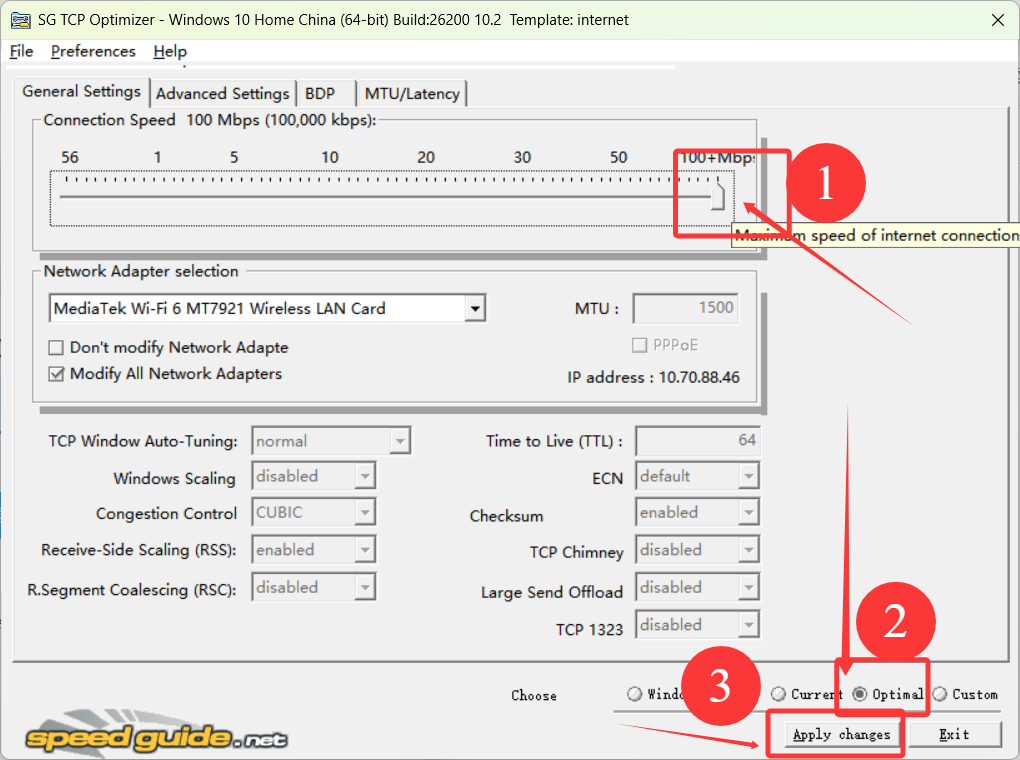
Figure: TCP Optimization Configuration Settings
Download Optimization Tool
For automated network optimization, download our configuration tool:
TCPOptimizer.exe
Automated TCP/IP optimization tool
Ensure your system allows PowerShell script execution. If you encounter permission issues, you may need to adjust your execution policy settings. For DMA connections, ensure proper drivers are installed and you have valid connection credentials.